How every number is checked
Buses come from the bus table in the official game manual, the only vehicle table it has so far. We compared 6 of them with gameplay videos, and every number we could see matched. The manual page shows an "old revision" notice although its revision history lists no newer edit, and its introduction still describes Transport Fever 2. The September 28 date is when the page was moved, not when the bus figures were last checked by the developers. We use only the bus table, which matched every gameplay video we checked.
Every other vehicle comes from the vehicle store as players show it in gameplay videos from the first days after release. A number is listed only when the vehicle store shows the same value in videos by two different players. A number seen in one video only is left out until a second video confirms it. So far that covers 26 vehicles from 10 channels. Under Sources, each one links to the exact moment in every video we used.
- Prices. Prices and running costs are those at Normal difficulty, with Vehicle Costs and Vehicle Maintenance at 100%. The setup screen in a video by City Planner Plays (at 3:01) shows those settings, and the prices in that game match the other videos wherever they show the same vehicle. Other settings change what you pay, so your own numbers may differ: the vehicle unlock guide explains why. Where two videos disagree on a price, as for the Handcar, we show both.
- End years. In some videos the store shows only the first year. When the videos that agree on a vehicle do not both show its last year, the list says the end year is not confirmed yet. That is the case for 13 of them, so check the store in your own game before you count on one.
- Built-in mods. In the video by Raptor the balance shows as infinite, the company sits at the top rank and the store lists no end years: the marks of the built-in No Costs, Tycoon and Vehicles: No End Year mods. According to the manual, those mods change money, company rank and end years, not vehicle stats, and the numbers in that video match the other videos wherever both show the same vehicle. We never take an end year from it. Videos of saves with community mods switched on are not used at all.
- Pre-release footage. For PS Trillium and TS Queen Mary, one of the two videos is labeled beta footage from before release. Its numbers match the release version in the other video.
- Imperial units. SizzlingPopcorn plays with weight in pounds and power in horsepower. We convert both to tonnes and kilowatts before comparing.
- Ratings. The store also rates noise, pollution and passenger comfort in words such as Good or Poor. Videos show different words for the same vehicle, so the ratings stay out of the list for now.
Reading the vehicle store in your game
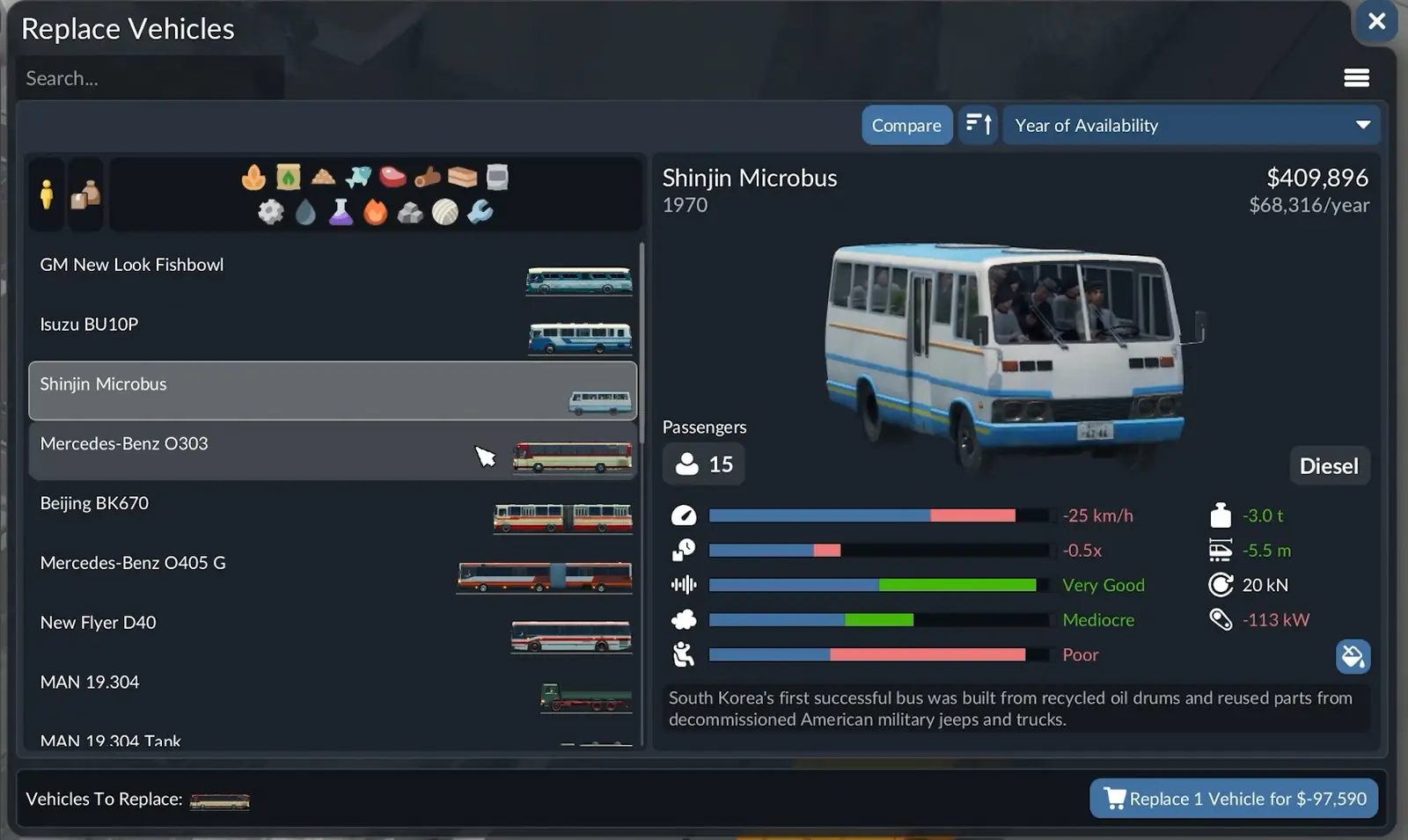
- Years. The year or years under the name are when the vehicle is for sale. The vehicle unlock dates guide covers what happens at the end and how the built-in Vehicles: No End Year mod keeps old vehicles.
- Turn Compare off before you note numbers. With it on, several stats turn into plus and minus differences.
- Loading speed is the vehicle's own base rate. In play it also depends on the cargo and on whether vehicle, terminal and warehouse belong to the same cargo group. The cargo unloading guide lists which cargo is Bulk, Goods, Liquid or Flatbed, the groups some vehicles in this list are limited to.
- Small and large ships. The shipyard sorts ships into the two sizes, and a large ship can only use a large landing at a harbor.
- Trains are put together from locomotives, wagons and multiple units, each on its own tab of the train store, so this list keeps them apart too.
What the list does not cover yet
- Most vehicles. Official counts range from over 270 models to more than 300 vehicles, so this list is a start. We add vehicles as soon as a second video confirms their numbers.
- Aircraft and helicopters. None has two matching videos yet.
Seen different numbers in your game? Tell us which vehicle, what the store shows and your difficulty settings.
Related guides and tools
- Vehicle unlock dates: when depots, airports and heliports arrive, and which buses are for sale in each start year.
- Train signals and deadlocks: what to check when your trains stop moving.
- Production chain planner: work out which cargo your trucks, trains and ships should carry.
Sources
- Official manual, Simulation › Vehicles (bus table last edited September 13, 2026)
- Official manual, Free Game (start year, gameplay settings, built-in mods, revised September 29, 2026)
- Official manual, Stations and Depots (depot, airport and heliport years, revised September 29, 2026)
- Official manual, Lines and Vehicles (what the vehicle store shows, revised September 29, 2026)
- Gameplay video by City Planner Plays: watch on YouTube
- Gameplay video by Biffa Plays Indie Games: watch on YouTube
- Gameplay videos by Surtr Plays: video 1, video 2
- Gameplay videos by Nivarias: video 1, video 2, video 3
- Gameplay video by Flabaliki: watch on YouTube
- Gameplay video by Donut's Transport Fever: watch on YouTube
- Gameplay video by SizzlingPopcorn: watch on YouTube
- Gameplay video by UnjustOdin: watch on YouTube
- Gameplay video by Raptor: watch on YouTube
- Gameplay video by Tachyon Lance: watch on YouTube
Bus table checked on October 5, 2026; video numbers last checked on October 6, 2026. Each vehicle shows its own check date under Sources.