Transport Fever 3 Roads: How to Upgrade Streets, Lanes and Highways
How to upgrade a road in place, make one-way streets, add bus lanes, trees and traffic lights, and pick bridges and tracks, with the speed limit, lanes, years and price of every street type in the official manual.
Last updated Game version: Release version, manual page revised 2026-09-29
The short answer
Upgrade with replace mode. Pick the new street type, switch to replace mode and click the road. Step by step
One-way streets are their own types. Small and medium streets come as one-way and two-way versions. The large street has no one-way version in the manual's list. All street types
Bus lanes are on the Tools tab. Open the Roads menu, switch to Tools and use the bus lane tool on the street. All street tools
No houses along fast roads. Towns can put buildings along small, medium and large streets, but no new houses appear along country roads or highways.
How to upgrade a road
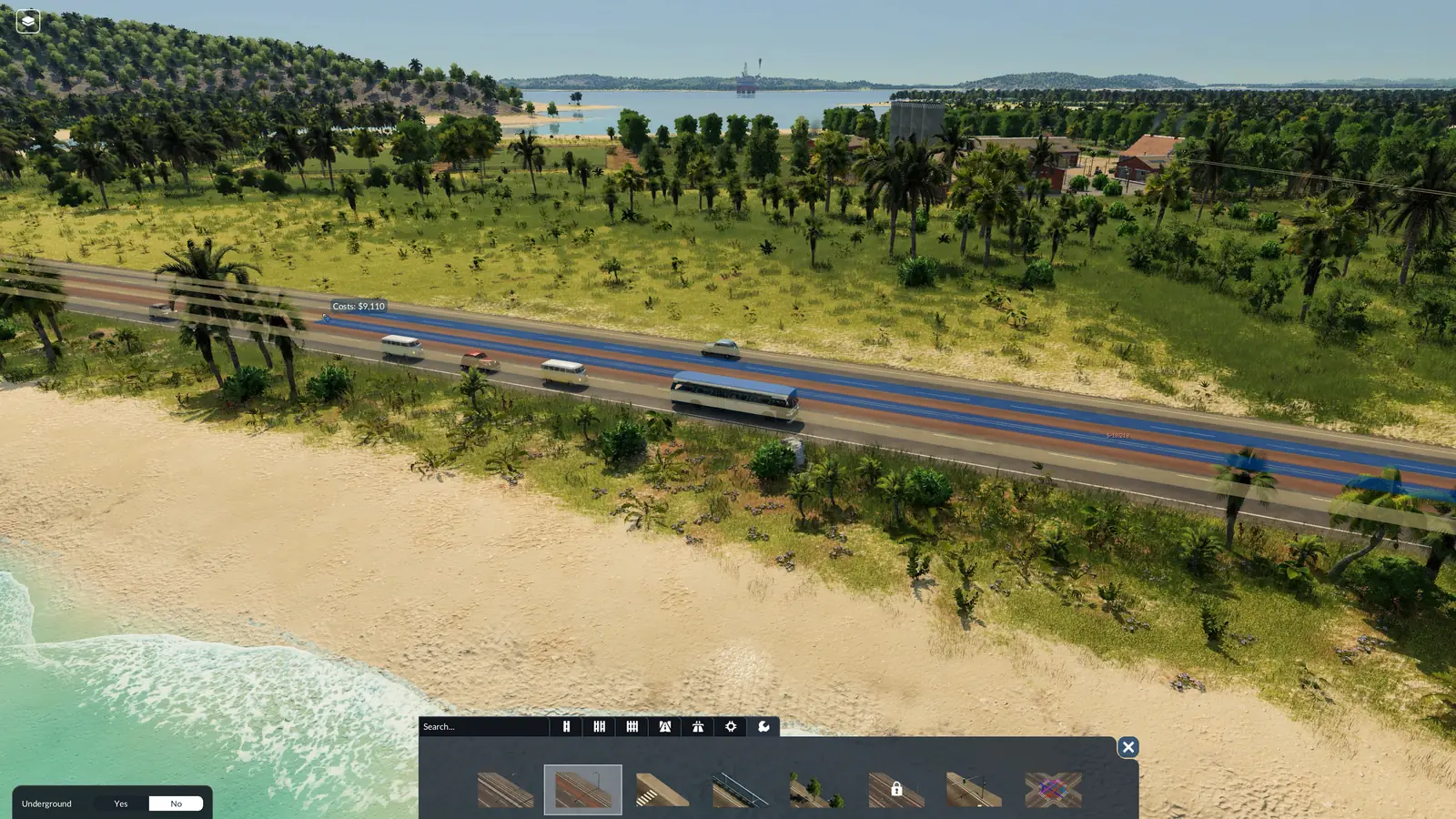
To upgrade a street, open the Roads menu, pick the street type you want and switch to replace mode on the left. Stretches of a different type turn yellow and stretches that already match turn blue. One click changes everything on screen between two junctions, or up to the next change of street type; hold Shift to change only some sections.
Replace mode can also add or remove tram tracks and bus lanes in the same step. When you replace a street with another street type, the default Keep setting leaves its tram tracks and bus lanes where they are.
Check what it costs. What you pay is the price per meter of the street or track, plus any reshaping of the ground, bridges (dearer the higher they stand), tunnels (dearer the deeper they go) and extras such as overhead wires.
Keep it yours if the town should leave it alone. Towns lay and upgrade streets by themselves as they grow. Streets are usually not yours, even the ones you built, so towns can build along them and any traffic may use them. The Tools tab can make a street yours: towns then stop upgrading it, and you pay for its upkeep.
Vehicles spread over every lane that leads where they are going, and faster ones use a spare lane to pass slower ones.
From the official manual
Every street type: speed, lanes, years and price
There are five kinds of road: small, medium and large streets with sidewalks for towns, with two, four and six lanes; country roads, faster, for links between towns; and highways, the fastest, for long distances across the map.
Street
Kind
Lanes
Cost per meter
Speed limit and years
Narrow Street
Town street
2
36
20 km/h, 1850–194030 km/h, from 1940
Small Street
Town street
2
60
40 km/h, 1850–194050 km/h, from 1940
Narrow One-Way Street
Town street, one-way
2
72
50 km/h, from 1940
Small One-Way Street
Town street, one-way
2
120
50 km/h, from 1940
Medium Street
Town street
4
180
40 km/h, 1850–194050 km/h, from 1940
Medium One-Way Street
Town street, one-way
4
240
50 km/h, from 1940
Large Street
Town street
6
80
60 km/h, 1850–194060 km/h, from 1940
Small Country Road
Country road
2
180
60 km/h, 1850–194080 km/h, from 1925
Medium Country Road
Country road
4
360
60 km/h, 1850–194080 km/h, from 1925
Large Country Road
Country road
6
540
60 km/h, 1850–194080 km/h, from 1925
One-Lane Highway
Highway
1
180
100 km/h, from 1940
Two-Lane Highway
Highway
2
360
120 km/h, from 1940
Three-Lane Highway
Highway
3
540
120 km/h, from 1940
Where two speeds are listed, the first is for the older version of the street (1850–1940) and the second for the newer one.
The manual lists 80 per meter for the Large Street, less than the 180 it lists for the Medium Street. We show the manual's figure; check the price in game before you plan around it.
Bus lanes, trees, noise barriers, crossings and lights
Bus lanes, noise barriers and trees can be added to small, medium and large streets and taken off again later. The Tools tab of the Roads menu adds and removes bus lanes, and tram tracks with or without overhead wires. Private cars generally stay out of bus lanes. Like replace mode, each tool changes the whole stretch on screen between two junctions; hold Shift to pick sections. Parts the tool has not changed yet show in yellow, the rest in blue.
Alley (street trees): The Alley tool in road construction lines a street with trees. Softens both the noise and the pollution of vehicles on that street. The street's top speed goes down.
Noise barrier: Streets: the Noise Barrier tool in road construction. Railways: the TOOLS tab of track construction. Cuts the noise of passing vehicles by a lot. No buildings can stand along a street that has a noise barrier.
The crosswalk tool adds or removes pedestrian crossings at junctions.
The traffic lights tool puts lights on a junction. Close the construction menu and select the lights to set them up: a window shows the phases and which lanes go together in each.
The crossing tool sets which lanes may turn where at a junction.
To turn a one-way street or a highway around, hold Ctrl while you use one of the street tools on it, or while you replace it with the same street type.
Noise and pollution from busy streets hold towns back: the town growth guide shows what else helps. Adding tram tracks to a street is covered in the trams guide.
When a street or track runs far enough above or below the ground, the game suggests a bridge or a tunnel, and you choose its type in the menu on the left. Bridges can be partial and curved. Underground mode, which you switch on in the left panel while building or with the G key, shows tunnels so you can work on them. While it is on, new streets and tracks do not connect to the ones above ground.
Bridge
In the game from
Speed limit
Stone Bridge
1900
90 km/h
Steel Bridge
1940
140 km/h
Suspension Bridge
1940
180 km/h
Concrete Bridge
1970
280 km/h
Cable-Stayed Bridge
2000
220 km/h
Tied Arch Bridge
2010
350 km/h
Railway tracks
Each street and track type has its own speed limit. On tracks, tighter curves lower it further, and a rail bridge can bring it below what the track itself allows. Each track type comes with and without overhead wires. Tracks cannot climb as steeply as streets, and their curves have a minimum radius.
Track
In the game from
Speed limit
Simple Tracks
1900
100 km/h
Standard Tracks
1930
160 km/h
High-Speed Tracks
1980
350 km/h
Trains also need signals once more than one runs on a track: see the train signals guide. When each street and track type appears depends on your start year; the unlock dates guide explains how years work.
What the manual does not say
How much faster buses get on a bus lane, or how much traffic a lane takes.
What a bridge or a tunnel costs per meter: the manual only says the price grows with the height or the depth.
Why the Large Street is listed cheaper per meter than the Medium Street.
Frequently asked questions
How do I upgrade roads in Transport Fever 3?
To upgrade a street, open the Roads menu, pick the street type you want and switch to replace mode on the left. Stretches of a different type turn yellow and stretches that already match turn blue. One click changes everything on screen between two junctions, or up to the next change of street type; hold Shift to change only some sections. Replace mode can also add or remove tram tracks and bus lanes in the same step.
How do I make a one-way street?
Build or replace it with a one-way street type: the Narrow One-Way Street (from 1940), the Small One-Way Street (from 1940), and the Medium One-Way Street (from 1940). To turn a one-way street or a highway around, hold Ctrl while you use one of the street tools on it, or while you replace it with the same street type.
How do bus lanes work?
The Tools tab of the Roads menu adds and removes bus lanes, and tram tracks with or without overhead wires. Private cars generally stay out of bus lanes. Bus lanes, noise barriers and trees can be added to small, medium and large streets and taken off again later.
Why are no houses built along my road?
Towns can put buildings along small, medium and large streets, but no new houses appear along country roads or highways. No buildings can stand along a street that has a noise barrier.
What is the fastest road in Transport Fever 3?
The Two-Lane Highway and the Three-Lane Highway, at 120 km/h, from 1940. The fastest bridge is the Tied Arch Bridge at 350 km/h, from 2010, and the fastest track is High-Speed Tracks at 350 km/h.
What do street trees and noise barriers do?
Alley (street trees): softens both the noise and the pollution of vehicles on that street. The street's top speed goes down. Noise barrier: cuts the noise of passing vehicles by a lot. No buildings can stand along a street that has a noise barrier.
Sources
The facts and numbers on this page come from the official manual:
Streets and Tracks (street, bridge and track types, replacing streets, the street tools and underground mode; revised September 29, 2026)
Checked on October 10, 2026. Seen something different in game? Let us know.