What “Missing tram lane” means
Somewhere between two stops, the way the line needs runs out of tram lane: from there on the game only finds an ordinary street lane, and a tram cannot drive on that. It is a line problem. The line gets a problem icon in the line manager, the stretch between the two stops gets a red exclamation mark, and hovering that mark shows the text.
There is no separate tram stop to build. As soon as tram track runs along a bus stop’s street, or into a station, that stop serves trams too. So the tram track has to run through every stop on the lane the stop uses, along every street between them, and around a turn where the line comes back.
Check these in order
1. A stop uses a lane without tram track
A street stop has a terminal on each lane, and the game picks one for every stop of a line by itself. After a street is widened, or a bus line is turned into a tram line, a stop can end up on a lane the tram track does not run on, often a middle lane while the track runs along the outer lanes.
Fix: Open the line in the line manager, use the move button on that stop's row, and pick the terminal on the lane with the tram track.
The game sets each stop’s terminal itself, from the platforms the line’s vehicles can get to and how busy each one is. To choose another, use the move button on the stop’s row in the line window or in the HUD. The line manager guide explains the line window and its stop rows.
2. The tram has nowhere to turn
A tram cannot turn back on an ordinary street. At the end of the line it needs tram track to turn on: a loop, a dead end with tram track, or a turn for trams set at a junction. When a town widens a street, a turn that used to work can disappear.
Fix: Open the crossing tool in the Roads menu, switch it to tram lanes and connect the tram lanes at a junction near the end of the line. Or run the line around a block, so it comes back without turning.
In the crossing tool you set, junction by junction, which lane may turn which way. The roads guide covers the other street tools.
3. A short piece of street has no tram track
When tram track is added along a route, a short piece is easy to miss: the stretch next to a junction, a short slope, or part of a street upgraded later. On a wide street the track can also run on the inner lanes while the stops are on the outer ones.
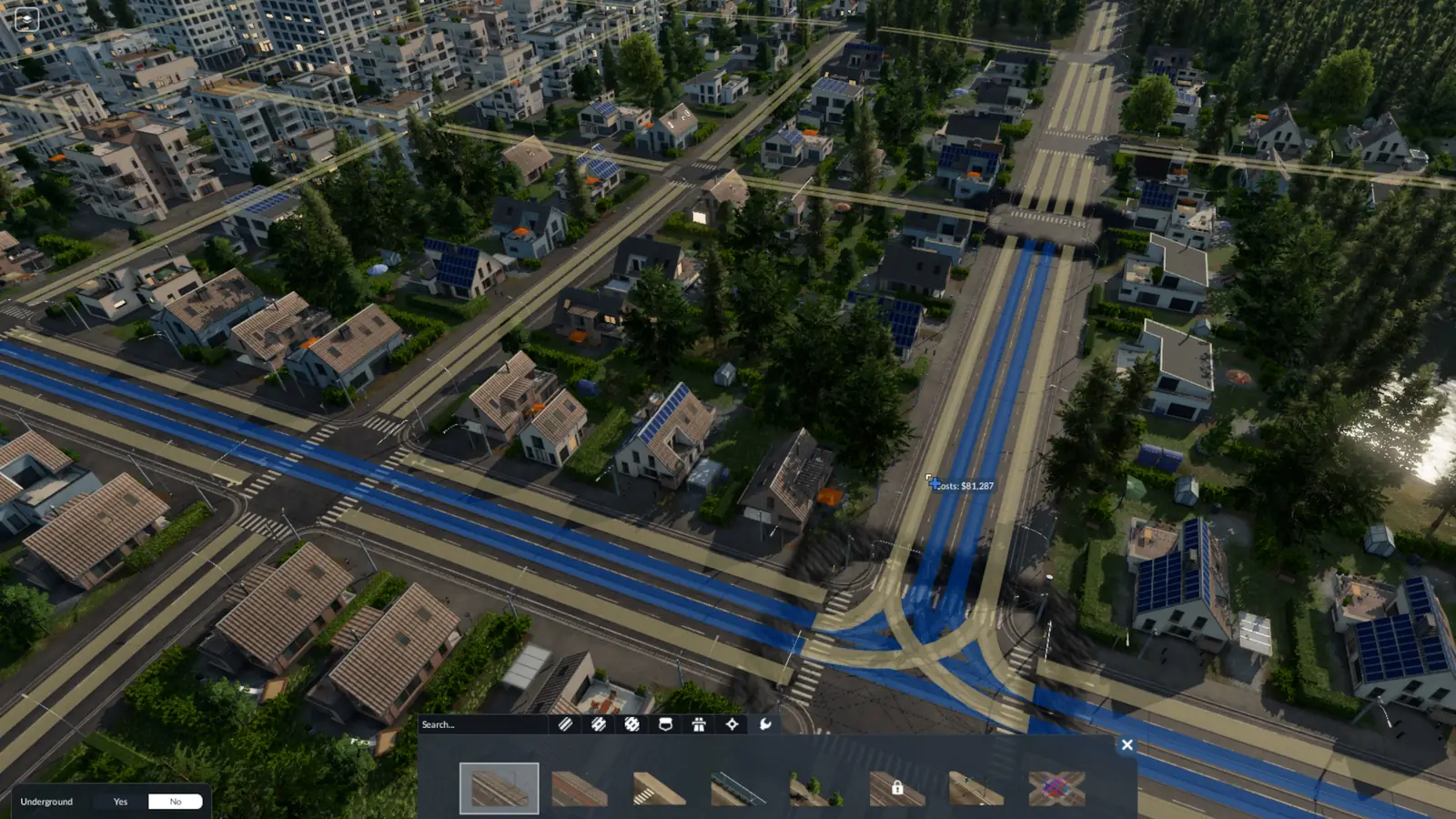
Fix: Open the Tools tab of the street menu and pick the tram track tool: streets without tram track show yellow. Add it there, on the same lanes as the rest of the line.
The tram track tool works on streets that are already built: it lays tram track with or without overhead wires, and takes it away again. One click covers the stretch on screen from one junction to the next; hold Shift to choose single sections. Stretches the tool has not been used on yet show yellow, all others blue. Swapping a street for another street type keeps its tram track: the replace tool’s Keep setting, which is on by default, leaves tram track and bus lanes where they were.
A different message?
If the line says “Missing catenaries” instead, the tram track is there but the overhead wires are not: electric trams need wires all the way. Trams themselves, from horse trams to tram-trains, are in the tram guide, and the depot and stops in the stations and depots guide.
Frequently asked questions
What does “Missing tram lane” mean in Transport Fever 3?
Somewhere between two stops, the way the line needs runs out of tram lane: from there on the game only finds an ordinary street lane, and a tram cannot drive on that. It is a line problem. The line gets a problem icon in the line manager, the stretch between the two stops gets a red exclamation mark, and hovering that mark shows the text. It has three common causes: a stop uses a lane without tram track; the tram has nowhere to turn; a short piece of street has no tram track.
Why did my tram line break after I upgraded the street?
Swapping a street for another street type keeps its tram track: the replace tool’s Keep setting, which is on by default, leaves tram track and bus lanes where they were. But a wider street has more lanes, so a stop can move to a lane without tram track. Open the line in the line manager, use the move button on that stop's row, and pick the terminal on the lane with the tram track.
Can trams make a U-turn in Transport Fever 3?
A tram cannot turn back on an ordinary street. At the end of the line it needs tram track to turn on: a loop, a dead end with tram track, or a turn for trams set at a junction. When a town widens a street, a turn that used to work can disappear. Open the crossing tool in the Roads menu, switch it to tram lanes and connect the tram lanes at a junction near the end of the line. Or run the line around a block, so it comes back without turning.
How do I find where the tram lane is missing?
When a stop of a line cannot reach the next one, the line has a connection problem: the line manager marks that stretch with a red exclamation mark, and hovering it shows what is wrong. Then open the tram track tool and look along that stretch: streets without tram track show yellow there.
Which terminal does a tram stop use?
The game sets each stop’s terminal itself, from the platforms the line’s vehicles can get to and how busy each one is. To choose another, use the move button on the stop’s row in the line window or in the HUD.
Sources
The rules on this page come from the official Transport Fever 3 manual:
- Lines and Vehicles (connection problems, the red exclamation mark, picking a stop's terminal; revised September 29, 2026)
- Streets and Tracks (the tram track tool, yellow and blue sections, the crossing tool; revised September 29, 2026)
Checked on November 16, 2026. Seen something different in game? Let us know.